AI video trends · Outfit transitions
Ceiling Fan Transition Trend: Make the AI Outfit Change
By Bolly teamPublished 8 min read
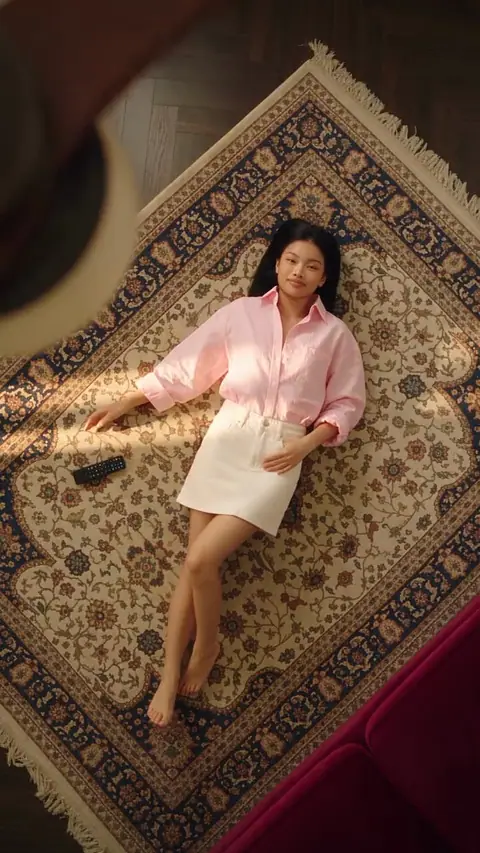
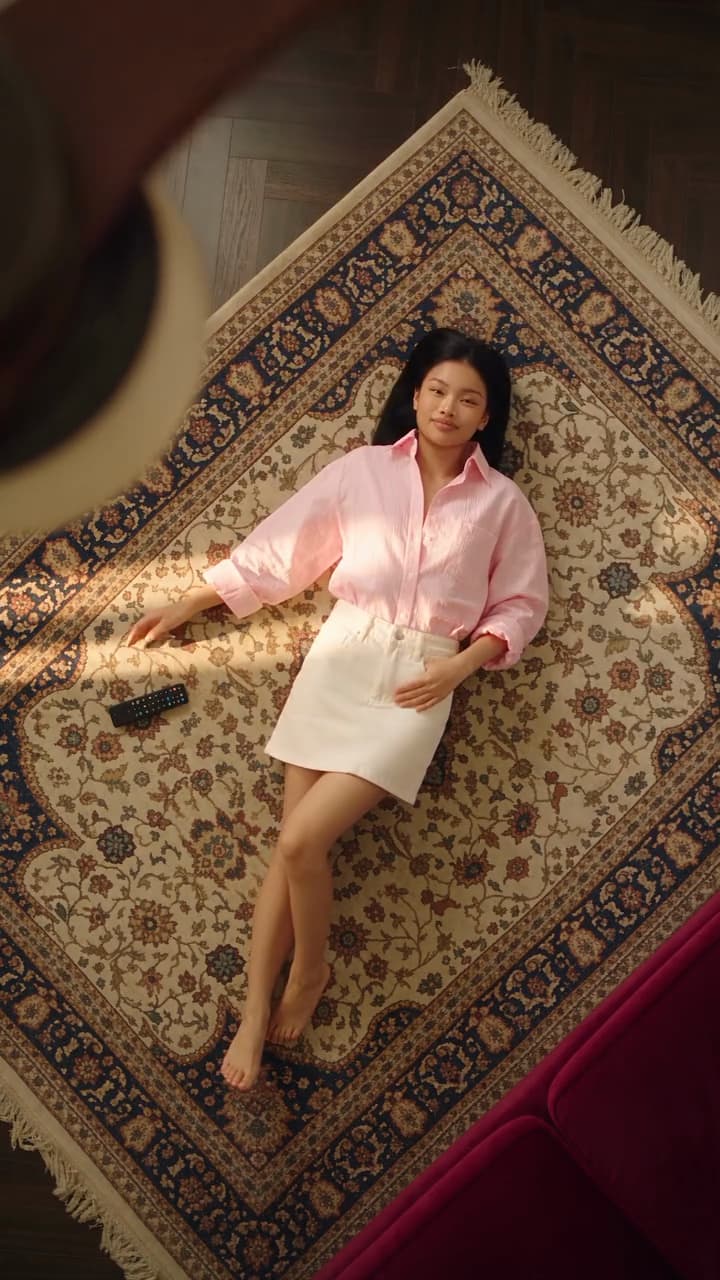
The ceiling fan transition is an outfit-change video trend shot straight down at someone lying on the floor under a spinning ceiling fan. Each outfit change is hidden behind a blade sweeping past the lens, so they seem to change clothes without getting up. People film it on a phone and hide the changes in the edit; creator @aiwithdonna makes an AI version she calls Under the Fan. The fastest way to make it on Bolly is to remix the Fan Outfit Transition template with one photo of yourself: 76 credits for the 15-second clip on any paid plan, with Bolly asking the model to swap you in while keeping the clip's four outfits.
Want your own looks, or a new room behind every blade pass? Build it from scratch with a reference sheet in Nano Banana 2 and a video in Seedance 2.5. Both routes follow.
What the ceiling fan transition looks like
The camera points straight down from the ceiling, and the fan's blades turn just below the lens, between it and the person lying on the floor. Each time a blade sweeps across the lens, the change happens behind it. In our template the next look is revealed along the blade's edge as it passes, like a wipe; other versions hide a hard cut on a frame the blade covers completely. The change can be just the outfit, or the floor and props as well.
Our template is the outfit-only version. A woman on a patterned rug in warm sunlight points a remote up at the fan in a black dress, then switches to an oversized pink shirt with a white mini skirt, then a white tank under an open red shirt with a denim mini skirt, and finally a brown short-sleeved shirt dress, ending the clip on her phone.
Why the fan blade transition works
It's a hidden transition: the join happens behind something moving across the lens, so nobody sees it. Four things sell it.
- A locked overhead camera. No pan, tilt or zoom, so the frames before and after each change line up and read as one shot.
- A blade that hides the join. Change the look only behind a passing blade. In our template a blade sweeps diagonally across her body and the next outfit is already there wherever it has passed, while the rug stays exactly the same.
- The same spot in every look. Her head and body stay in the same place on the rug, so it reads as one continuous shot even though her arms move between looks.
- A reason for the motion. In our template's first look she points a remote at the fan, which gives the first change a cause. Pointing a finger or snapping works too.
Space the changes evenly so they read as a beat, ideally on the music. Our 15-second template fits three changes and four looks.
The fastest way: remix the Fan Outfit Transition template
Most templates in Mix, Bolly's character swap tool, replace a person along with their clothes, using the outfit from your photo. This one is flagged to keep the clip's clothing: Bolly tells the model to take only your face, hair, skin tone and body type from the photo, keep every outfit from the clip and change outfits at the same moments. It's an instruction, not a guarantee: AI edits can drift, so check the result before posting.
Template
Fan Outfit Transition15 seconds, vertical, with music. One person to replace; Bolly asks the model to keep all four outfits.
Remix this templateOpen the template
Go to the Fan Outfit Transition page, or press Remix on its card on the home page.
Upload one photo
Use a clear, front-facing photo in good light, without sunglasses, heavy filters or other people. JPG, PNG and phone photos up to 30 MB work, and a head-and-shoulders shot is enough because this template doesn't ask for your clothes. It must be you, or someone who agreed to it (see our consent rules).
Press Swap me in
Mix needs a paid plan, from Starter up (see pricing). Bolly reserves 76 credits for this 15-second clip when the run starts.
Wait for your Library
The video lands in your Library. Right now that can take 5 to 10 minutes, and you can close the tab in the meantime. Failed runs are refunded automatically.
Check it, label it, post it
Kling O3, the default engine, keeps the clip's audio, so the music comes through. If a look drifts, try again with a sharper, front-facing photo. When you post it, mark it as AI-generated, as our labeling rules ask.
Note: Using a fan clip from TikTok instead
Mix also takes a public TikTok link and uses its first 15 seconds, but the keep-the-outfits setting comes with the template. On a pasted clip, Bolly asks for the clothes from your photo, which works against the outfit changes.
Make your own version from scratch
To pick the outfits yourself, or change the whole room on every pass, generate the looks first and animate them second. Nano Banana 2 runs on every plan, including Free; Seedance 2.5 needs Plus or above.
1. Generate a four-look reference sheet
In Nano Banana 2, set the aspect ratio to 9:16 and the resolution to 2K (5 credits a run). A 2x2 grid of vertical panels keeps the sheet at 9:16 and each look large. This example uses an invented character and four seasonal outfits on one rug, like our template; swap in your own.
Fashion reference sheet: a 2x2 grid of four vertical photos, each taken from directly above the same woman in her twenties, with shoulder-length copper hair and freckles, lying on her back on a faded blue-and-cream patterned rug over dark floorboards. Her arms rest at her sides and she looks up into the lens.

LOOKS, one per photo:
1. Top left, autumn: rust knit sweater, brown corduroy mini skirt, low ponytail.
2. Top right, winter: cream cable-knit turtleneck, grey wool trousers, knitted beanie.
3. Bottom left, spring: pale green linen dress, loose waves held back with a clip.
4. Bottom right, summer: striped swimsuit under an open white shirt, wet slicked-back hair.

Warm late-afternoon sun across the rug from the left, natural skin and fabric texture, 35mm film look.
2. Animate it with Seedance 2.5
In Seedance 2.5, switch the mode to Reference to video and attach the sheet; the prompt calls it @Image1. Set 9:16 and 10 seconds: 190 credits at 720p, or 89 at 480p for drafts. The mode takes 4 to 30 seconds, aspect ratios from 21:9 to 9:16 and several reference images, so you can also attach each look as its own picture and name them @Image1 to @Image4.
Overhead shot looking straight down at the woman from @Image1, lying on her back on the blue-and-cream rug. A ceiling fan with long brown wooden blades turns between her and the lens, each blade sweeping diagonally across her body. The rug, her place on it and the camera stay the same from start to finish; never show the grid from @Image1.

TIMELINE, using the four looks from @Image1 in order:
0 to 2.5 s, autumn: she points a small remote up at the fan and clicks it.
2.5 s: a blade sweeps across her. Wherever it has passed, she is in the winter look, arms now resting on the rug with the remote beside her hand.
5 s: the next blade leaves her in the spring look, one hand on her hip.
7.5 s: another blade leaves her in the summer look. She lifts her phone above her face and scrolls until the end.

Photorealistic, warm late-afternoon sun, the soft whir of the fan.
Warning: Your own face in a from-scratch version
Seedance runs ByteDance's own content checker, which refused a real person's photo in our Seedance 2.5 edit tests, so a photo of yourself may be refused here too (refused runs are refunded). To star in the trend yourself, use the template, or animate an invented character and try swapping yourself into the 720p render with Kling O3 Video Edit (Plus plan, from 168 credits).
Tips and honest limits
- Stick to three or four looks. In 10 seconds, four looks get about 2.5 seconds each; add more and the outfits blur together.
- If an outfit changes in plain view, say again that each look appears only behind a passing blade, drop a look or give each one more time, and test again at 480p.
- Check hands, the remote and the phone. Video models can warp small props held up to the camera, so keep them plain.
- Want a new room on every pass? Give each look its own floor and props in the sheet, and in the video prompt let the floor change with the outfit instead of keeping the same rug.
- The template is built around its four looks. Bolly asks the model to keep them, so to pick the outfits yourself, use the from-scratch route.
- Add text and music afterwards. Keep on-screen words out of the prompts and add labels and a sound in your editor, timed to the changes, or put a track on the clip with Merge Audio & Video, such as a song from Make a Song.
Ready to make yours? Remix the Fan Outfit Transition template with one clear photo; it's 76 credits on any paid plan. Want two people in one clip? Group templates let you choose who each photo replaces; our guide to the STORM II group swap walks through it.
Frequently asked questions
What is the ceiling fan transition trend?
A vertical video, filmed on a phone or generated with AI, that looks straight down at someone lying under a spinning ceiling fan. Each change is hidden behind a blade as it sweeps past the lens, so they appear in a new outfit, and sometimes a new room, without getting up.
How much does the Fan Outfit Transition template cost on Bolly?
76 credits per run. Mix charges per second of clip at the Kling O3 rate, and this template is 15 seconds long. You need a paid plan: Starter ($19 a month, 300 credits) covers three runs from its monthly credits alone, and failed runs are refunded. See pricing for the other plans.
Will the video use my clothes or the ones in the clip?
The clip's, if the model follows Bolly's instructions. This template is set to keep the original outfits, so Bolly asks the model to take your face, hair, skin tone and body type from the photo and leave the four outfits and their timing alone. Results can still vary, so check the video before posting.
Can I make the ceiling fan transition on the Free plan?
Partly. A reference sheet in Nano Banana 2 costs 4 or 5 credits, which fits in the 10 free credits every account gets each day. The video steps need a paid plan: Mix works from Starter up, and Seedance 2.5 needs Plus ($59 a month, or $47 a month billed yearly).
How long does it take?
Swaps and Seedance clips land in your Library when they're done. At the moment that can take 5 to 10 minutes, and you can close the page while you wait.
Can a friend be in the video with me?
Not in this template, which has one person. Mix takes up to two photos per run on two-person templates such as Quavo & Takeoff - Hotel Lobby, where you pick who each photo replaces. Only use a friend's photo if they've agreed.
Inspired by creator @aiwithdonna's Under the Fan guide (opens in a new tab); our from-scratch route follows its two steps, a reference sheet first and then a Seedance 2.5 video.
Try the Fan Outfit Transition template
Upload a photo and Bolly swaps you into the clip. Mix comes with every paid plan, from Starter at $19 a month, and failed runs are refunded automatically.
More from the blog
How-to
How to Make AI Videos: From Text, a Photo or a Clip
Make an AI video from text, a photo or a template clip. Pick a model, copy four prompts, add sound and export, with the real credit cost of each model.
· 9 min read
How-to
How to Animate a Photo With AI: Steps, Prompts and Costs
Animate a photo with AI: prepare the picture, pick a model, copy five motion prompts for portraits, pets and old photos, and see what each clip costs.
· 7 min read
Prompts
Nano Banana Prompts: 17 Copy-Paste Examples and Use Cases
17 copy-paste Nano Banana prompts for photo edits, product shots, posters and figurines, with what to attach, how to run them and what each image costs.
· 10 min read
AI video pricing
AI Video Generator Pricing: What a Clip Really Costs (2026)
What AI video costs in 2026: Bolly credits per model for 5 s and 10 s clips, plan rates, clips per month, and how Runway and Higgsfield credits compare.
· 8 min read