AI video trends · Character swap
Yung Lean STORM II AI Trend: Put Yourself in the Crowd
By Bolly teamPublished 8 min read
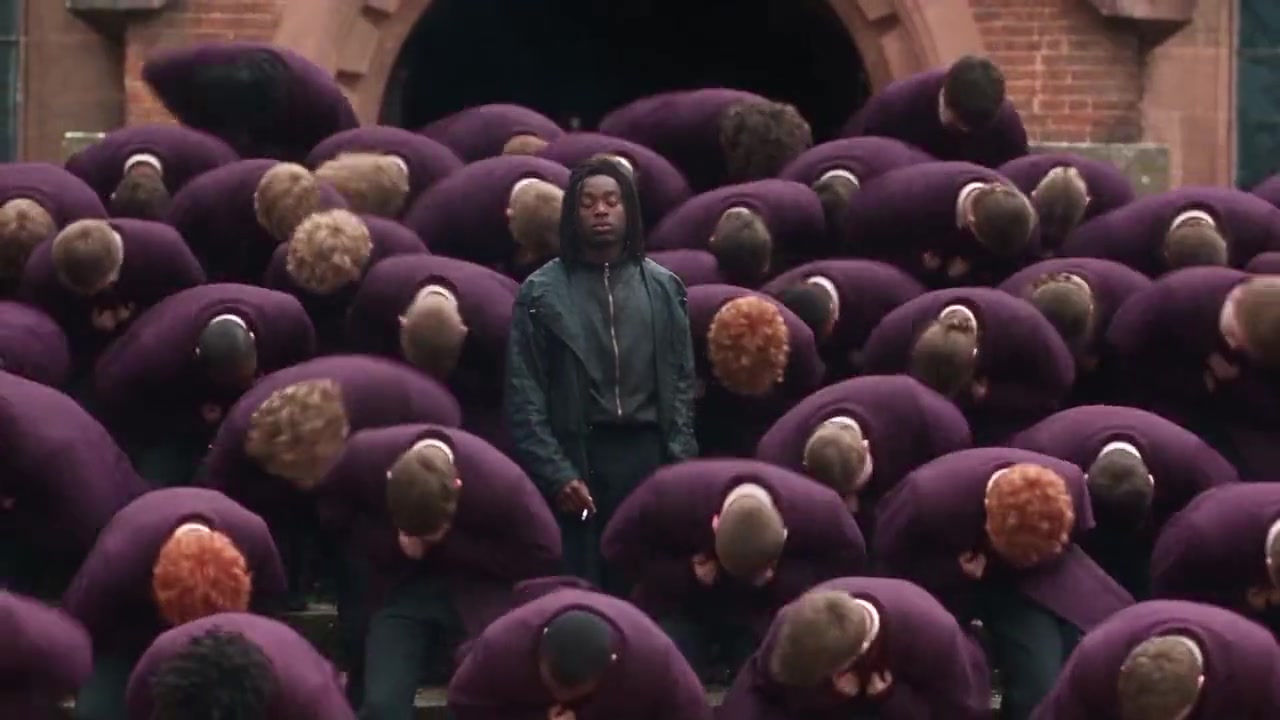
The STORM II AI trend, or STORM II group swap, is an edit where creators put themselves into the crowd scenes of STORM II, the April 2026 video from GENER8ION and Yung Lean, as the one person who stays upright while rows of schoolboys in blazers bow and dance around them. The fastest way to make your own on Bolly is the Storm - Assembly template, which mirrors the start of the video's crowd scene: upload one photo and Bolly swaps you in as the lone standing figure, for 76 credits per 15-second run. Bringing a friend? Storm - Couple replaces two standing people in a single run.
What is the STORM II group swap?
STORM II is the second part of STORM, a short film and double single from GENER8ION starring Yung Lean, directed by Romain Gavras. It's set at a British boarding school and ends with a huge dance sequence: a crowd of boys in school blazers moving as one on the school steps while Yung Lean stands among them.
The trend borrows that contrast. One figure stays out of step while everyone around them moves in unison, and the swap puts you, or you and a friend, in the spot every eye goes to. Some creators go further and replace the rest of the crowd with copies of a second character. Either way, the crowd does the heavy lifting: it makes a one-photo edit look like a full production.
The fastest way: remix Storm - Assembly
Storm - Assembly follows the opening of the STORM II crowd scene. A lone figure walks away from the camera through tiered rows of pupils, turns to face the lens from deep in the crowd, and stays upright when the rows fold into a bow in front of a brick school building. It isn't the original footage: the blazers here are purple, and the walker wears a dark teal jacket and shoulder-length locs. That walker is the one person the template replaces.
Template
Storm - Assembly15 seconds, 16:9, with sound. One person to replace: the walker.
Remix this templateMix, Bolly's character swap tool, runs the swap on Kling O3's video-edit model, which Bolly also offers on its own as Kling O3 Video Edit. Bolly asks it to replace the walker with the person in your photo, copying their face, hair, skin tone, build and clothing, and to keep the movement, timing, camera, lighting, background and every pupil as filmed. If Kling O3 rejects or fails a job, Bolly retries once on MiniMax H3 Max, which follows the original motion more loosely.
Open the template
Go to the Storm - Assembly page, or tap Remix on the template's home-page card.
Add one photo
Upload a sharp, front-facing photo of just you: a JPG, PNG or phone photo up to 30 MB. Wear what you want to be seen in, because Bolly asks the model to use the clothes in your photo.
Press Swap me in
Sign in if needed. Mix is available from the Starter plan up (plans and credits), and the run holds 76 credits for this 15-second template.
Wait for your Library
You land in your Library, where the video appears when it's ready. That can take 5 to 10 minutes right now, and closing the tab doesn't stop it. Failed runs are refunded automatically.
Check it, label it, post it
Play it through with sound on (Kling O3 keeps the clip's original audio) and check your face all the way through, since small faces can drift. When you share it, mark it as AI-generated.
Add a friend: Storm - Couple and other two-person templates
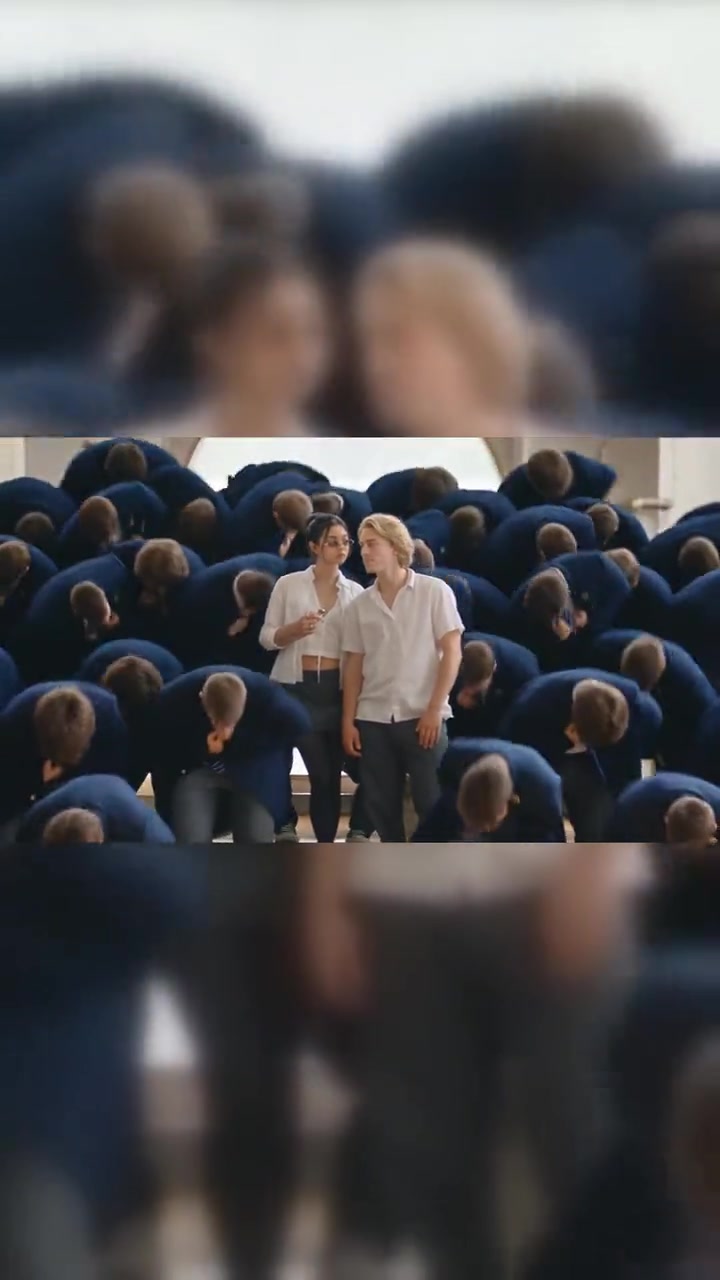
Storm - Couple moves the same idea into a hall: pupils in navy blazers bow and throw their heads back in unison while two people in white shirts stay standing, one in glasses on the left and one with blond hair on the right. You can replace both in one run.
Template
Storm - Couple11 seconds, vertical, no soundtrack. Two people to replace, left and right.
Remix this templateHow you choose who each photo replaces
Templates with more than one person ask Who do you want to replace? and show a chip per person, named after how they look and where they stand, such as Glasses, white shirt (left). Select one chip or both, and each gets its own labelled photo slot: you on one side and your friend on the other, or just one of you with the other person left as filmed. Storm - Couple costs 61 credits either way.
More two-person templates

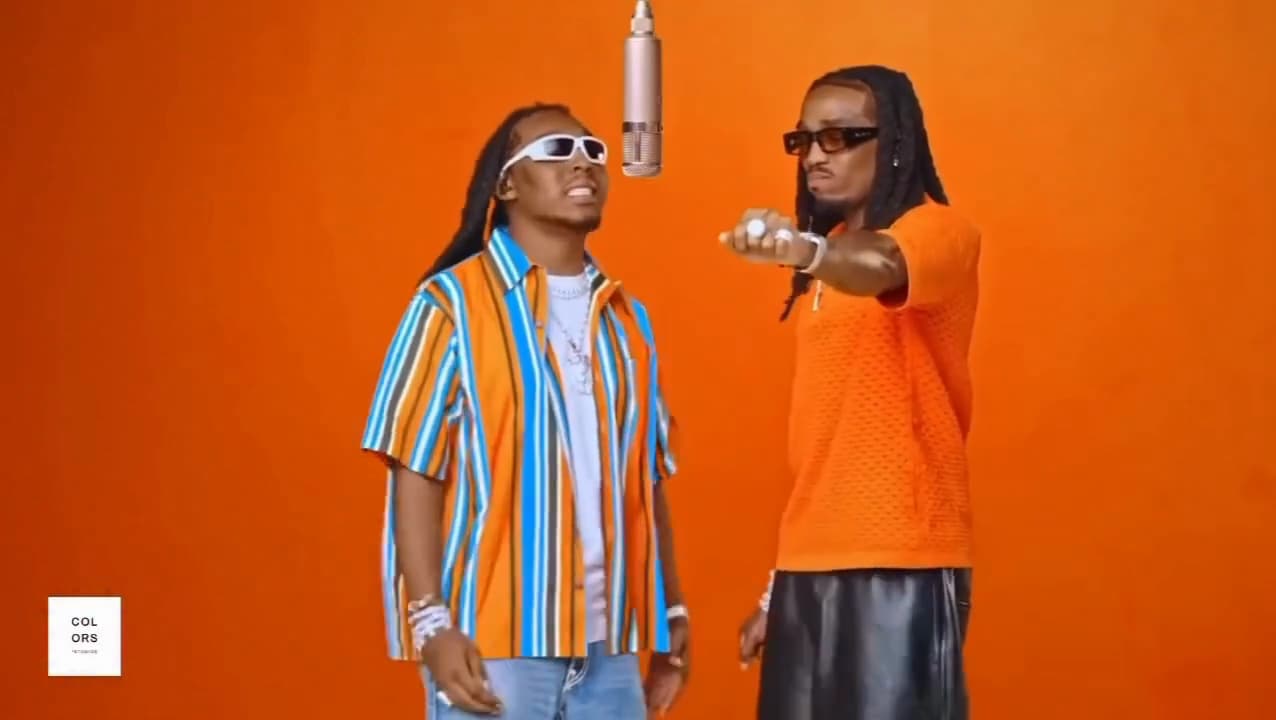
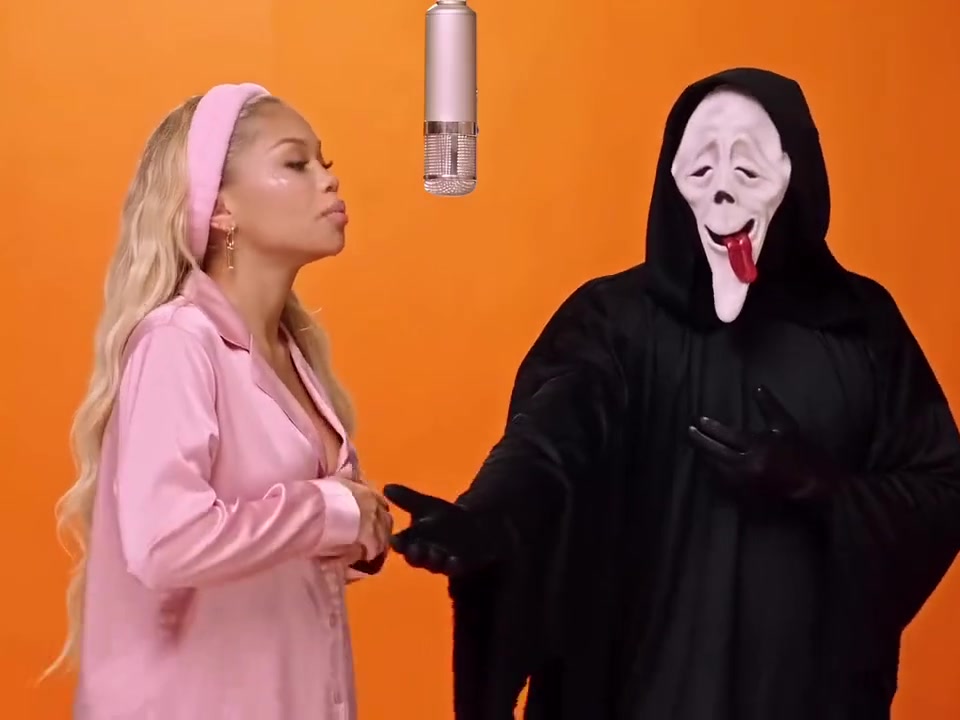
Both are 15-second clips with sound, shot on an orange studio set with a hanging microphone, at 76 credits a run. Quavo & Takeoff - Hotel Lobby has two rappers: a striped short-sleeve shirt and white sunglasses on the left, an orange knit shirt and black sunglasses on the right. Ghostface Rap Duo pairs a singer in pink satin pyjamas (left) with a figure in a Ghostface mask and black robe (right); swap only the singer to keep the mask.
Swap into your own group clip
Have a different group video in mind? Paste its public TikTok link into Mix. Bolly uses the first 15 seconds, and a pasted clip gets one photo slot, so it's one person per run. An optional box lets you describe who to replace in up to 120 characters. Leave it empty and Bolly asks the model for the main person, which in a crowd tends to be whoever is most prominent.
Example who-to-replace descriptions (use one per run):
- the person in the red jacket who stands still while everyone around them dances
- the woman in the yellow raincoat at the far left of the front row
- the person in the grey hoodie at the back, second from the right
Tip: Point at one person
In a crowd of matching uniforms, describe what sets your person apart: clothing, hair, their spot in the frame (left, centre, front row) and what they do while everyone else moves.
Photo tips for group swaps
- One person per photo. Give each person their own clear shot. A group photo in one slot leaves the model to guess which face you mean.
- Face the camera in even light. Sharp and front-facing, with nothing over the face: no sunglasses, masks or heavy filters, and head and shoulders in frame.
- Dress for the scene. Because Bolly asks the model to use the clothes in your photo, a white shirt, or a blazer and tie, suits a STORM-style crowd better than a hoodie.
- Show your hair. In Storm - Assembly you're seen from behind at first, so your hairstyle matters as much as your face.
- Check the slots before you submit. Each photo should sit under the label of the person it replaces.
Honest limits
- Two people per run, at most. Mix replaces up to two people and asks the model to leave everyone else as filmed, so it won't turn the crowd into copies of one character. That takes a new generation instead, such as the Reference to video mode of Seedance 2.5 (Plus plan), which builds a fresh clip from your references rather than editing this one. Use an invented or illustrated character there, not a selfie: in our testing, ByteDance's content checker refused a Seedance 2.5 job that included a realistic photo of a person (refused runs are refunded).
- Left and right can trade places. On two-person clips the model occasionally puts each face on the other person. Re-run it, or move the two photos to the opposite slots; each run is charged separately.
- Small faces lose detail. Deep in the rows, the Storm - Assembly walker's face is small, so your likeness shows more in hair, build and clothes than in fine features.
- Storm - Couple is silent. Its source clip has no audio track, so a Kling O3 result has none either; if the run falls back to MiniMax H3 Max, that model may add generated sound of its own. Add sound in your editor, or on Bolly with Merge Audio & Video.
- No guarantees. AI edits can drift on small or turning faces. If yours slips, re-run with a clearer, straight-on photo.
Consent: whose faces you can use
Group swaps make it tempting to drop friends in without asking. Bolly's rules allow your own face, or the face of someone who has clearly agreed to be in this video; a friend being fine with a photo online isn't the same as agreeing to an AI clip. Never upload a photo of anyone under 18, even with a parent's permission. The full rules are in our Responsible AI policy, and when you post, follow the AI labeling rules by marking the video as AI-generated.
Templates can include clips from music videos and shows that belong to other people, so keep your remixes personal and non-commercial unless you have the rights holders' permission (see other people's work).
What a STORM II swap costs
Mix prices a run by the length of the clip: every second, rounded up, at the Kling O3 rate. The number of people you replace doesn't change the price.
- Storm - Assembly, 15 seconds: 76 credits
- Storm - Couple, 11 seconds: 61 credits
- Quavo & Takeoff - Hotel Lobby and Ghostface Rap Duo, 15 seconds each: 76 credits
- Your own TikTok clip: up to 76 credits, since only the first 15 seconds are used
Mix is available on every paid plan, from Starter up. Starter ($19 a month) includes 300 credits, enough for three Storm - Assembly runs or four of Storm - Couple; Plus ($59 a month, or $47 a month billed yearly) includes 1,200, enough for 15 full-length runs. Compare plans on the pricing page.
Ready to make yours? Remix Storm - Assembly with one photo, or use Storm - Couple to bring a friend.
Up next, a solo trend that works the other way round: in the ceiling fan outfit transition, Bolly asks the model to keep the clip's outfits and take only your face, hair, skin tone and build from the photo.
Frequently asked questions
What is the STORM II AI trend?
An AI edit of the crowd scenes in STORM II, the April 2026 video from GENER8ION and Yung Lean. Creators swap themselves in as the person who stays standing while rows of schoolboys in blazers bow and dance around them; some versions also turn the crowd into copies of a second character.
Can I put a friend in the STORM II swap with me?
Yes. Storm - Couple has two standing people you can replace in one run: select both chips and add a photo for each. Upload a friend's photo only with their permission.
How much does a STORM II swap cost on Bolly?
76 credits for the 15-second Storm - Assembly template and 61 for the 11-second Storm - Couple template. Mix needs a paid plan, Starter or above, and replacing two people costs the same as replacing one. Failed runs are refunded automatically.
Can Bolly replace everyone in the crowd?
No. Mix replaces up to two people per run and keeps everyone else as filmed, so it can't turn a crowd into copies of one character.
Why did our faces land on the wrong people?
On two-person clips the model occasionally mixes up left and right. Run it again, or move the photos to the opposite slots; each run is charged separately.
Is the Storm - Assembly template the original STORM II footage?
No. It follows the start of the video's crowd scene, a walk back through the rows and then a bow, but the pupils wear purple blazers and the walker wears a dark teal jacket. Storm - Couple is a separate two-person clip set in a hall.
Inspired by creator @aiwithdonna's STORM II group-swap guide.
Try the Storm - Assembly template
Upload a photo and Bolly swaps you into the clip. Mix comes with every paid plan, from Starter at $19 a month, and failed runs are refunded automatically.
More from the blog


How-to
How to Make AI Videos: From Text, a Photo or a Clip
Make an AI video from text, a photo or a template clip. Pick a model, copy four prompts, add sound and export, with the real credit cost of each model.
· 9 min read


How-to
How to Animate a Photo With AI: Steps, Prompts and Costs
Animate a photo with AI: prepare the picture, pick a model, copy five motion prompts for portraits, pets and old photos, and see what each clip costs.
· 7 min read
Prompts
Nano Banana Prompts: 17 Copy-Paste Examples and Use Cases
17 copy-paste Nano Banana prompts for photo edits, product shots, posters and figurines, with what to attach, how to run them and what each image costs.
· 10 min read
AI video pricing
AI Video Generator Pricing: What a Clip Really Costs (2026)
What AI video costs in 2026: Bolly credits per model for 5 s and 10 s clips, plan rates, clips per month, and how Runway and Higgsfield credits compare.
· 8 min read